显示或隐藏图标和任务栏_Win10和Win11.cmd.txt
@echo offif "%1"=="h" goto begin
start mshta vbscript:createobject("wscript.shell").run("""%~nx0"" h",0)(window.close)&&exit
:begin
rem 从注册表获取当前数值
FOR /F "tokens=2,*" %%A IN ('REG Query "HKCU\Software\Microsoft\Windows\CurrentVersion\Explorer\StuckRects3" /V "Settings" ^|findstr "Settings"') DO (
SET SETTINGS=%%B
)
FOR /F "tokens=2,*" %%A IN ('REG Query "HKCU\Software\Microsoft\Windows\CurrentVersion\Explorer\Advanced" /V "HideIcons" ^|findstr "HideIcons"') DO (
SET HIDEICONS=%%B
)
FOR /F "tokens=2,*" %%A IN ('REG Query "HKCU\Software\Microsoft\Windows\CurrentVersion\Explorer" /V "ShellState" ^|findstr "ShellState"') DO (
SET SHELLSTATE=%%B
)
FOR /F "tokens=2,*" %%A IN ('REG Query "HKCU\Software\Microsoft\Windows\Shell\Bags\1\Desktop" /V "FFlags" ^|findstr "FFlags"') DO (
SET FFLAGS=%%B
)
IF "%HIDEICONS%" == "0x0" (
rem 隐藏任务栏
REG ADD "HKCU\Software\Microsoft\Windows\CurrentVersion\Explorer\StuckRects3" /V Settings /T REG_BINARY /d %SETTINGS:~0,17%3%SETTINGS:~-78% /F
rem 隐藏桌面图标
REG ADD "HKCU\Software\Microsoft\Windows\CurrentVersion\Explorer\Advanced" /V HideIcons /T REG_DWORD /D 1 /F
REG ADD "HKCU\Software\Microsoft\Windows\CurrentVersion\Explorer" /V ShellState /T REG_BINARY /D %SHELLSTATE:~0,10%3%SHELLSTATE:~-61% /F
REG ADD "HKCU\Software\Microsoft\Windows\Shell\Bags\1\Desktop" /V FFlags /T REG_DWORD /D %FFLAGS:~0,6%1%FFLAGS:~-3% /F
rem 在这行下面添加隐藏任务栏和桌面图标后需要执行的命令,比如启动某软件
) ELSE (
rem 显示任务栏
REG ADD "HKCU\Software\Microsoft\Windows\CurrentVersion\Explorer\StuckRects3" /V Settings /T REG_BINARY /d %SETTINGS:~0,17%2%SETTINGS:~-78% /F
rem 显示桌面图标
REG ADD "HKCU\Software\Microsoft\Windows\CurrentVersion\Explorer\Advanced" /V HideIcons /T REG_DWORD /D 0 /F
REG ADD "HKCU\Software\Microsoft\Windows\CurrentVersion\Explorer" /V ShellState /T REG_BINARY /D %SHELLSTATE:~0,10%2%SHELLSTATE:~-61% /F
REG ADD "HKCU\Software\Microsoft\Windows\Shell\Bags\1\Desktop" /V FFlags /T REG_DWORD /D %FFLAGS:~0,6%0%FFLAGS:~-3% /F)
rem 在这行下面添加显示任务栏和桌面图标后需要执行的命令,比如关闭某软件
)
rem 等待1秒
TIMEOUT 1 >NUL
rem 重启资源管理器
TASKKILL /F /IM explorer.exe
START explorer.exe
显示/隐藏桌面图标
REG ADD "HKCU\Software\Microsoft\Windows\CurrentVersion\Explorer\Advanced" /V HideIcons /T REG_DWORD /D 0 /F
taskkill /f /im explorer.exe
start explorer.exe
REG ADD "HKCU\Software\Microsoft\Windows\CurrentVersion\Explorer\Advanced" /V HideIcons /T REG_DWORD /D 1 /F
taskkill /f /im explorer.exe
start explorer.exe
河南省人力资源和社会保障厅关于工程技术人才职称制度改革有关问题的通知
http://rsj.kaifeng.gov.cn/upload/editor/file/2021/08/24/6376539810249262836474726.pdfosd-font
#OSD文字字体osd-font = "凤凰点阵体 16px" #OSD字体
MPV.CONF
##解码/渲染设置##

#视频输出驱动,Windows可选gpu/gpu-next/direct3d等,gpu最成熟稳定,gpu-next为实验性,direct3d只在为兼容老旧系统硬件时使用
vo=gpu

#设置硬解api,auto/auto-copy/no 对应 自动/自动-拷回内存/软解
hwdec=auto

#渲染使用的api,可选auto/d3d11/opengl/vulkan
gpu-api=auto

#尝试使用硬解的格式(默认h264,vc1,hevc,vp8,vp9,av1;all是特殊值指全部格式)
#hwdec-codecs=all

#gpu-api=d3d11时(win默认api)多GPU平台指定使用的GPU,GPU名称参考设备管理器。此选项根据首字符串识别,如果不是同一家的GPU则无需输入完整名称。若使用Vulkan则为vulkan-device=
#d3d11-adapter=AMD
#d3d11-adapter=Intel
#d3d11-adapter=NVIDIA

#d3d11va零拷贝模式,可降低gpu 3D engine占用
#d3d11va-zero-copy=yes

##缓存设置##

#开启缓存
cache=yes

#最大缓存大小(KiB或MiB)
demuxer-max-bytes=64MiB

#用内存而不是磁盘缓存
cache-on-disk=no

#缓存时间
#cache-secs=8

##播放状态记录##

#退出时记住播放状态(包括是否暂停、音量、播放速度、位置等)
save-position-on-quit

#播放状态保存位置
#watch-later-directory=D:\Cache\watch_later

#不记录是否暂停(除了pause同理可写fullscreen,mute,speed,ontop等参数)
watch-later-options-remove=pause

#记录播放状态时忽略文件路径(便于备份/共享,但会影响同名文件区分)
#ignore-path-in-watch-later-config

##窗口设置##

#贴边吸附(限windows平台)
snap-window=yes

#高分屏窗口缩放
#hidpi-window-scale=no

#无边框
border=no

#置顶
ontop=yes

#全屏
fullscreen=yes

#窗口保持视频比例
#keepaspect-window=no

#播完后保持打开(yes|no|always)
#keep-open=no

#将窗口缩放窗口模式下至大、至小占屏幕的百分比
#autofit-larger=90%x90%
#autofit-smaller=30%x30%

#设置默认打开的窗口大小、位置(下例是1280x720、屏幕左下角)
#geometry=1280x720+100%+100%

##OSD设置##

#关闭屏上信息条显示
osd-bar=no

#osd-bar宽度[1,100],屏幕宽度的百分比
osd-bar-w=100

#osd-bar高度[0.1,50]屏幕高度的百分比
osd-bar-h=0.4

#位置[-1,1]x为左到右,y为上到下
osd-bar-align-y=1

#OSD颜色,RGB16进制表示
osd-color="#7FFFD4"
osd-text=TEST001

#OSD信息位置、字体大小、边框大小(左中右left/center/right,上中下top/center/buttom)
osd-align-x=left
osd-align-y=top
osd-font-size=22
osd-border-size=2

#设置OSD文本信息的持续时间(毫秒)
osd-duration=2000000

#OSD随窗口大小缩放
osd-scale-by-window=no

##视频/音频/字幕/截图设置##

#读取杜比视界元数据(需要将vo=gpu改为实验性的vo=gpu-next)
#vf=format:dolbyvision=yes

#色彩管理
#icc-profile-auto=yes

#视频同步
#video-sync=display-resample
#interpolation=yes

#变速播放时的音调修正
audio-pitch-correction=yes

#音调修正的不静音最大倍速
#af=scaletempo2=max-speed=4

#自动加载外部字幕文件方式。(fuzzy加载同文件夹含有视频文件名的字幕文件)
sub-auto=fuzzy

#自动加载含有视频文件名的音频文件
#audio-file-auto=fuzzy

#字体大小,此值是以高度为720的屏幕为比例,更大或更小的屏幕会缩放
sub-font-size=44

#未指定样式的字幕字体
sub-font=sans-serif

#未指定样式的字幕边框
sub-border-size=2

#强制外挂ass字幕可使用黑边
sub-ass-force-margins=yes

#指定优先使用音轨(使用ISO-639语言代码,优先级按序递减)
alang=zh,chi,chs,sc,zh-hans,en,eng

#指定优先使用字幕轨(同上)
slang=zh,chi,chs,sc,zh-hans,en,eng

#列表播放循环方式,N|inf|no,循环N次/一直循环/不循环
loop-playlist=inf

#启动默认音量
volume=90

#程序最大音量[100,1000]
volume-max=100

#截屏文件格式(可选:jpg、jpeg、png、webp、jxl)
screenshot-format=jpg

#截屏文件保存路径
#screenshot-directory=C:\Image

##杂项##

#禁用内置快捷键方案,builtin与default相比不影响脚本的预设快捷键
no-input-builtin-bindings

#关闭内置屏上控制On Screen Controller(OSC)
osc=no

#输出日志到桌面
#log-file = "~~desktop/mpv.txt"

#录制媒体流到指定文件
#stream-record=C:\Videos\output.mp4

##配置组##
#不要在配置组之间插入常规配置

#暂停或全屏时不置顶
[ontop-playback]
profile-cond=pause or fullscreen
ontop=no
profile-restore=copy

#当文件所在路径包含'music'时,禁用记录播放状态、OSC常驻
#[music]
#profile-cond=require 'mp.utils'.join_path(working_directory, path):match('music') ~= nil
#save-position-on-quit=no
#script-opts-add=osc-visibility=always
#profile-restore=copy
mpv
#贴边吸附(限win)snap-window=yes
#无边框
no-border
#全屏
fullscreen
#关闭简易控制面板On Screen Controller(osc)
no-osc
#关闭屏上信息条显示
volume=0
# 软解
#hwdec=no
# 硬解
hwdec=auto
profile=gpu-hq
gpu-api=d3d11
# may help with 4K videos
vd-lavc-dr=yes
opengl-pbo=yes
#循环
loop-playlist=inf
loop-file=inf
https://www.appinn.com/xiaofengche-for-live-wallpaper/
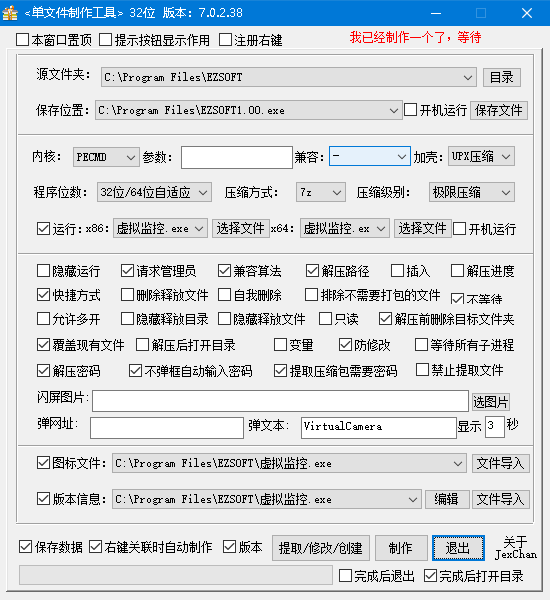
https://www.appinn.com/xiaofengche-for-live-wallpaper/单文件制作工具打包发布软件参数备份
QT下载链接
https://download.qt.io/new_archive/qt/5.14/5.14.2/批处理把字符串插入到xml指定位置
@echo off
setlocal enabledelayedexpansion
set "inputFile=config.ini"
set "outputFile=onvif.ini"
set "insertString=rtsp://127.0.0.1:8554/screenlive+audiodevice"
set "targetStartTag=<stream_uri>"
set "targetEndTag=</stream_uri>"
set "insertLine=%targetStartTag%%insertString%%targetEndTag%"
(
  for /f "delims=" %%I in ('type "%inputFile%" ^& echo/') do (
    set "line=%%I"
    if "!line!"=="!line:%targetStartTag%=%!" (
      echo %%I
    ) else (
      echo !insertLine!
    )
  )
) > "%outputFile%"
echo Done!
标签TAGS
友情链接
热门文章
电脑维修

实时监控