海康威视监控摄像头网页直播
2025-12-14 乱云飞 监控 评论(0) 浏览(54) 标签: 海康威视 监控摄像头 网页直播
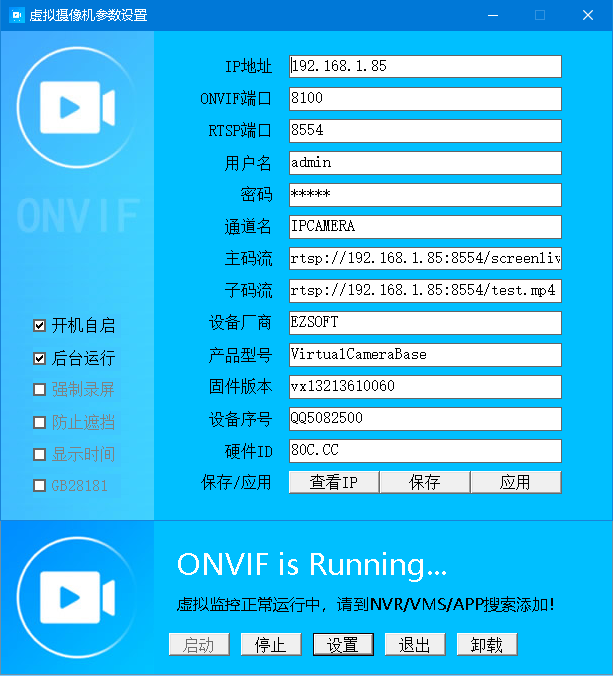
虚拟监控软件VirtualCamera20251007新版本下载链接
2025-10-7 乱云飞 监控 评论(0) 浏览(292) 标签: VirtualCamera 虚拟监控软件 下载链接
鼠标操作模拟程序(保留拖动功能版)
; 鼠标操作模拟程序(增加消息功能)
; 编译命令: 将本文件保存为 1.ahk,然后使用 Ahk2Exe 编译为 1.exe
; 使用方法: 1.exe 命令 参数...

#NoEnv
#SingleInstance Force
SendMode Input
SetWorkingDir %A_ScriptDir%
CoordMode, Mouse, Screen  ; 使用屏幕坐标

; 解析命令行参数
Command := A_Args[1]
Param1 := A_Args[2]
Param2 := A_Args[3]
Param3 := A_Args[4]
Param4 := A_Args[5]

; 检查参数数量
if (Command = "")
{
    MsgBox 使用方法:`n1.exe L X Y         - 鼠标左键单击`n1.exe R X Y         - 鼠标右键单击`n1.exe LL X Y        - 鼠标左键双击`n1.exe M X Y         - 鼠标移动到指定坐标`n1.exe M +X +Y       - 鼠标相对移动(+右移 -左移 +下移 -上移)`n1.exe M X1 Y1 X2 Y2  - 鼠标拖动(从X1,Y1按下左键,移动到X2,Y2释放)`n1.exe msg 消息内容   - 弹出消息提示框`n`n示例:`n1.exe M 100 100`n1.exe M +30 -50`n1.exe L 100 100`n1.exe M 100 100 200 200`n1.exe msg 任务完成!
    ExitApp
}

; 随机等待时间函数(200-500ms)
RandomSleep()
{
    Random, SleepTime, 200, 500
    Sleep, %SleepTime%
}

; 检查字符串是否以+或-开头
IsRelativeCoord(ByRef Coord)
{
    if (SubStr(Coord, 1, 1) = "+" or SubStr(Coord, 1, 1) = "-")
    {
        return true
    }
    return false
}

; 解析相对坐标
ParseRelativeCoord(Coord, CurrentPos)
{
    ; 获取符号和数值
    Sign := SubStr(Coord, 1, 1)
    Value := SubStr(Coord, 2)
    Value += 0  ; 转换为数字

    if (Sign = "+")
    {
        return CurrentPos + Value
    }
    else if (Sign = "-")
    {
        return CurrentPos - Value
    }
    return CurrentPos
}

; 确保坐标是数字的函数
ValidateCoordinates(ByRef X, ByRef Y)
{
    if (X = "" or Y = "")
    {
        return false
    }
    X += 0
    Y += 0
    return true
}

; 获取当前鼠标位置
MouseGetPos, CurrentX, CurrentY

; 根据命令执行相应操作
if (Command = "L")  ; 左键单击
{
    ; 检查是否为相对坐标
    if (IsRelativeCoord(Param1) or IsRelativeCoord(Param2))
    {
        ; 获取当前鼠标位置
        MouseGetPos, CurrentX, CurrentY

        ; 解析相对坐标
        if (IsRelativeCoord(Param1))
            TargetX := ParseRelativeCoord(Param1, CurrentX)
        else
            TargetX := Param1 + 0

        if (IsRelativeCoord(Param2))
            TargetY := ParseRelativeCoord(Param2, CurrentY)
        else
            TargetY := Param2 + 0
    }
    else
    {
        if (!ValidateCoordinates(Param1, Param2))
        {
            MsgBox 错误:左键单击需要提供X和Y坐标
            ExitApp
        }
        TargetX := Param1
        TargetY := Param2
    }

    ; 移动到目标坐标并单击
    MouseMove, %TargetX%, %TargetY%, 0
    RandomSleep()
    Click, %TargetX%, %TargetY%, left, 1
}
else if (Command = "R")  ; 右键单击
{
    ; 检查是否为相对坐标
    if (IsRelativeCoord(Param1) or IsRelativeCoord(Param2))
    {
        ; 获取当前鼠标位置
        MouseGetPos, CurrentX, CurrentY

        ; 解析相对坐标
        if (IsRelativeCoord(Param1))
            TargetX := ParseRelativeCoord(Param1, CurrentX)
        else
            TargetX := Param1 + 0

        if (IsRelativeCoord(Param2))
            TargetY := ParseRelativeCoord(Param2, CurrentY)
        else
            TargetY := Param2 + 0
    }
    else
    {
        if (!ValidateCoordinates(Param1, Param2))
        {
            MsgBox 错误:右键单击需要提供X和Y坐标
            ExitApp
        }
        TargetX := Param1
        TargetY := Param2
    }

    ; 移动到目标坐标并单击
    MouseMove, %TargetX%, %TargetY%, 0
    RandomSleep()
    Click, %TargetX%, %TargetY%, right, 1
}
else if (Command = "LL")  ; 左键双击
{
    ; 检查是否为相对坐标
    if (IsRelativeCoord(Param1) or IsRelativeCoord(Param2))
    {
        ; 获取当前鼠标位置
        MouseGetPos, CurrentX, CurrentY

        ; 解析相对坐标
        if (IsRelativeCoord(Param1))
            TargetX := ParseRelativeCoord(Param1, CurrentX)
        else
            TargetX := Param1 + 0

        if (IsRelativeCoord(Param2))
            TargetY := ParseRelativeCoord(Param2, CurrentY)
        else
            TargetY := Param2 + 0
    }
    else
    {
        if (!ValidateCoordinates(Param1, Param2))
        {
            MsgBox 错误:左键双击需要提供X和Y坐标
            ExitApp
        }
        TargetX := Param1
        TargetY := Param2
    }

    ; 移动到目标坐标并双击
    MouseMove, %TargetX%, %TargetY%, 0
    RandomSleep()
    Click, %TargetX%, %TargetY%, left, 2
}
else if (Command = "M")  ; 鼠标移动或拖动
{
    ; 检查参数数量来判断是移动还是拖动
    if (Param3 = "" and Param4 = "")  ; 只有两个参数,是移动操作
    {
        ; 检查是否为相对坐标
        if (IsRelativeCoord(Param1) or IsRelativeCoord(Param2))
        {
            ; 获取当前鼠标位置
            MouseGetPos, CurrentX, CurrentY

            ; 解析相对坐标
            if (IsRelativeCoord(Param1))
                TargetX := ParseRelativeCoord(Param1, CurrentX)
            else
                TargetX := Param1 + 0

            if (IsRelativeCoord(Param2))
                TargetY := ParseRelativeCoord(Param2, CurrentY)
            else
                TargetY := Param2 + 0
        }
        else
        {
            if (!ValidateCoordinates(Param1, Param2))
            {
                MsgBox 错误:鼠标移动需要提供X和Y坐标
                ExitApp
            }
            TargetX := Param1
            TargetY := Param2
        }

        ; 移动到目标坐标
        MouseMove, %TargetX%, %TargetY%, 0
    }
    else  ; 有四个参数,是拖动操作
    {
        ; 检查起点是否为相对坐标
        if (IsRelativeCoord(Param1) or IsRelativeCoord(Param2))
        {
            ; 获取当前鼠标位置作为起点基准
            MouseGetPos, CurrentX, CurrentY

            ; 解析起点相对坐标
            if (IsRelativeCoord(Param1))
                StartX := ParseRelativeCoord(Param1, CurrentX)
            else
                StartX := Param1 + 0

            if (IsRelativeCoord(Param2))
                StartY := ParseRelativeCoord(Param2, CurrentY)
            else
                StartY := Param2 + 0
        }
        else
        {
            if (!ValidateCoordinates(Param1, Param2))
            {
                MsgBox 错误:鼠标拖动需要提供起点坐标
                ExitApp
            }
            StartX := Param1
            StartY := Param2
        }

        ; 检查终点是否为相对坐标
        if (IsRelativeCoord(Param3) or IsRelativeCoord(Param4))
        {
            ; 终点相对坐标以起点为基准
            if (IsRelativeCoord(Param3))
                EndX := ParseRelativeCoord(Param3, StartX)
            else
                EndX := Param3 + 0

            if (IsRelativeCoord(Param4))
                EndY := ParseRelativeCoord(Param4, StartY)
            else
                EndY := Param4 + 0
        }
        else
        {
            if (!ValidateCoordinates(Param3, Param4))
            {
                MsgBox 错误:鼠标拖动需要提供终点坐标
                ExitApp
            }
            EndX := Param3
            EndY := Param4
        }

        ; 移动到起点
        MouseMove, %StartX%, %StartY%, 0
        RandomSleep()  ; 随机等待200-500ms

        ; 在起点按下左键
        Click, %StartX%, %StartY%, down

        ; 移动到终点(使用较慢的速度,使拖动更自然)
        MouseMove, %EndX%, %EndY%, 50
        RandomSleep()  ; 随机等待200-500ms

        ; 释放左键
        Click, up
    }
}
else if (Command = "msg")  ; 弹出消息框
{
    ; 组合消息内容(支持空格)
    MsgContent := Param1
    if (Param2 != "")
        MsgContent := MsgContent . " " . Param2
    if (Param3 != "")
        MsgContent := MsgContent . " " . Param3
    if (Param4 != "")
        MsgContent := MsgContent . " " . Param4

    ; 如果没有任何消息内容,使用默认消息
    if (MsgContent = "")
        MsgContent := "任务完成!"

    ; 弹出消息框(带确定按钮和信息图标)
    MsgBox, 64, 提示, %MsgContent%
}
else
{
    MsgBox 未知命令:%Command%
    ExitApp
}

ExitApp


	----------------------------------------------------------------


	# 移动到指定位置
1.exe M 1350 10
# 左键单击
1.exe L 1350 10
# 右键单击
1.exe R 200 200
# 左键双击
1.exe LL 100 100
# 相对移动
1.exe M +30 -50
# 相对单击
1.exe L +30 -50
# 拖动操作
1.exe M 100 100 200 200
# 消息提示
1.exe msg 操作完成!
牛20260222bak
![[该内容已加密,请点击标题输入密码访问]](/ez/jiami.png)
调试版源码
牛魔王V20260213A源码备份
使用未来函数写的买卖点调试代码
//-------------------调试信号开始-------------------
N1:=10;Z:=ZIG(3,N1);	//用到了未来函数,作为参考线比对其他指标准确性。
低买:=BACKSET(Z>REF(Z,1) AND REF(Z,1)<REF(Z,2),2);VERTLINE(低买,2),COLORRED;
高卖:=BACKSET(Z<REF(Z,1) AND REF(Z,1)>REF(Z,2),2);VERTLINE(高卖,2),colorgreen;
//-------------------调试信号结束-------------------
未来函数列表
未来函数列表:ZIG - 之字转向
PEAK - 前M个ZIG转向波峰值
PEAKBARS - 前M个ZIG转向波峰到当前距离
TROUGH - 前M个ZIG转向波谷值
TROUGHBARS - 前M个ZIG转向波谷到当前距离
FLATZIG - 归一化之字转向
FLATZIGA - 归一化之字转向
PEAKA - 前M个ZIG转向波峰值
PEAKBARSA - 前M个ZIG转向波峰到当前距离
TROUGHA - 前M个ZIG转向波谷值
ZIGA - 之字转向
FFT - 傅立叶变换函数
BACKSET - 将当前位置到若干周期前的数据设为1
WINNER - 获利盘比例
LWINNER - 近期获利盘比例
PWINNER - 远期获利盘比例
COST - 成本分布情况
CAPITAL - 当前流通股本
DYNAINFO - 即时行情数据
FINANCE - 财务函数
XMA - 返回偏移移动平均,
#MONTH - 跨周期引用
#WEEK - 跨周期引用
#YEAR - 跨周期引用
DHIGH - 返回该不定周期最高价
DOPEN - 返回该不定周期开盘价
DLOW - 返回该不定周期最低价
DCLOSE - 返回该不定周期收盘价
DVOL - 返回该不定周期成交量价
BARSNEXT - 下一次条件成立到当前的周期数
REFX - 引用若干周期后的数据(平滑处理),
REFXV - 引用若干周期后的数据(未作平滑处理)
DRAWLINE - 绘制直线段用到日后数据
持仓股票价格监控系统V28
#SingleInstance Force
#Persistent
#NoEnv
SetWorkingDir %A_ScriptDir%

;---------------------------------------
;	持仓股票价格监控系统
;	http://80c.cc/wwwylg
;	date:2026/1/9
;---------------------------------------

; 全局变量
股票列表 := []
更新时间 := 60000	; 60秒更新一次
每股市值基数 := 100	; 假设每只股票持有100股
最大显示行数 := 20	; 每页显示20行
当前页数 := 1		; 当前页码

; 初始化GUI
创建表格界面()

; 加载保存的股票代码
Gosub, 加载股票列表

; 设置定时器
SetTimer, 模拟点击按钮, %更新时间%
return

模拟点击按钮:
    ControlClick, Button5, 持仓股票价格监控系统
return

创建表格界面() {
    global

    ; 创建主窗口
    Gui, Main:New, +Resize +MaximizeBox
    Gui, Main:Font, s12, Microsoft YaHei
    Gui, Main:Color, FFFFFF

    ; 操作按钮区域
    按钮Y := 10
    按钮W := 80
    按钮H := 28
    按钮间距 := 15

    Gui, Main:Font, s10
    当前X := 10

    Gui, Main:Add, Button, x%当前X% y%按钮Y% w%按钮W% h%按钮H% g添加股票, 添加股票
    当前X += 按钮W + 按钮间距

    Gui, Main:Add, Button, x%当前X% y%按钮Y% w%按钮W% h%按钮H% g删除股票, 删除股票
    当前X += 按钮W + 按钮间距

    Gui, Main:Add, Button, x%当前X% y%按钮Y% w%按钮W% h%按钮H% g修改基数, 修改基数
    当前X += 按钮W + 按钮间距

    Gui, Main:Add, Button, x%当前X% y%按钮Y% w%按钮W% h%按钮H% g导出数据, 导出CSV
    当前X += 按钮W + 按钮间距

    Gui, Main:Add, Button, x%当前X% y%按钮Y% w%按钮W% h%按钮H% g手动更新, 手动更新
    当前X += 按钮W + 按钮间距

    ; 翻页按钮
    当前X += 30
    翻页按钮W := 70
    翻页按钮间距 := 15

    Gui, Main:Add, Button, x%当前X% y%按钮Y% w%翻页按钮W% h%按钮H% g上一页, 上一页
    当前X += 翻页按钮W + 翻页按钮间距

    Gui, Main:Add, Button, x%当前X% y%按钮Y% w%翻页按钮W% h%按钮H% g下一页, 下一页

    ; 分隔线
    Gui, Main:Add, Text, x10 y42 w710 0x10

    ; 股票列表标题行
    标题Y := 55

    ; 列宽定义
    local 序号宽度值 := 50
    local 名称宽度值 := 180
    local 代码宽度值 := 100
    local 价格宽度值 := 100
    local 持有股数宽度值 := 80  ; 新增:持有股数列宽度
    local 市值宽度值 := 100
    local 涨跌幅宽度值 := 100

    ; 计算每列的起始x坐标
    local 序号起始X值 := 15
    local 名称起始X值 := 序号起始X值 + 序号宽度值
    local 代码起始X值 := 名称起始X值 + 名称宽度值
    local 价格起始X值 := 代码起始X值 + 代码宽度值
    local 持有股数起始X值 := 价格起始X值 + 价格宽度值  ; 新增:持有股数列起始位置
    local 市值起始X值 := 持有股数起始X值 + 持有股数宽度值  ; 调整:市值列起始位置
    local 涨跌幅起始X值 := 市值起始X值 + 市值宽度值  ; 调整:涨跌幅列起始位置

    Gui, Main:Font, s12
    Gui, Main:Add, Text, x%序号起始X值% y%标题Y% w%序号宽度值% Center c333333, 序号
    Gui, Main:Add, Text, x%名称起始X值% y%标题Y% w%名称宽度值% Center c333333, 股票名称
    Gui, Main:Add, Text, x%代码起始X值% y%标题Y% w%代码宽度值% Center c333333, 股票代码
    Gui, Main:Add, Text, x%价格起始X值% y%标题Y% w%价格宽度值% Center c333333, 当前价格
    Gui, Main:Add, Text, x%持有股数起始X值% y%标题Y% w%持有股数宽度值% Center c333333, 持有股数  ; 新增:持有股数列标题
    Gui, Main:Add, Text, x%市值起始X值% y%标题Y% w%市值宽度值% Center c333333, 市值(元)
    Gui, Main:Add, Text, x%涨跌幅起始X值% y%标题Y% w%涨跌幅宽度值% Center c333333, 涨跌幅

    ; 股票数据行区域
    local 行高值 := 25
    local 起始Y值 := 标题Y + 25

    ; 创建20行数据区域
    Loop, %最大显示行数% {
        行号 := A_Index
        y位置值 := 起始Y值 + (行号-1) * 行高值

        Gui, Main:Add, Text, x%序号起始X值% y%y位置值% w%序号宽度值% Center v序号%行号%, --
        Gui, Main:Add, Text, x%名称起始X值% y%y位置值% w%名称宽度值% Center v名称%行号%, --
        Gui, Main:Add, Text, x%代码起始X值% y%y位置值% w%代码宽度值% Center v代码%行号%, --
        Gui, Main:Add, Text, x%价格起始X值% y%y位置值% w%价格宽度值% Center v价格%行号%, 0.00
        Gui, Main:Add, Text, x%持有股数起始X值% y%y位置值% w%持有股数宽度值% Center v股数%行号%, 100  ; 新增:持有股数列
        Gui, Main:Add, Text, x%市值起始X值% y%y位置值% w%市值宽度值% Center v市值%行号%, 0.00
        Gui, Main:Add, Text, x%涨跌幅起始X值% y%y位置值% w%涨跌幅宽度值% Center v涨跌%行号%, 0.00`%
    }

    ; 显示信息
    local 表格高度值 := 行高值 * 最大显示行数
    local 信息Y值 := 起始Y值 + 表格高度值 + 10

    ; 状态栏
    Gui, Main:Add, StatusBar

    ; 初始状态栏文本
    更新状态栏()

    ; 调整窗口宽度,以适应新增列
    local 窗口宽度值 := 涨跌幅起始X值 + 涨跌幅宽度值 + 20
    local 窗口高度值 := 信息Y值 + 30
    Gui, Main:Show, w%窗口宽度值% h%窗口高度值%, 持仓股票价格监控系统(洛阳牛魔王)
}

; 翻页功能
上一页:
    global 当前页数, 股票列表, 最大显示行数
    总页数 := Ceil(股票列表.Length() / 最大显示行数)
    if (当前页数 > 1) {
        当前页数 -= 1
    } else {
        当前页数 := 总页数
    }
    Gosub, 更新显示行
return

下一页:
    global 当前页数, 股票列表, 最大显示行数
    总页数 := Ceil(股票列表.Length() / 最大显示行数)
    if (当前页数 < 总页数) {
        当前页数 += 1
    } else {
        当前页数 := 1
    }
    Gosub, 更新显示行
return

更新显示行:
    global 股票列表, 当前页数, 最大显示行数, 每股市值基数

    总股票数 := 股票列表.Length()
    总页数 := Ceil(总股票数 / 最大显示行数)

    if (总页数 = 0) {
        当前页数 := 1
        总页数 := 1
    } else if (当前页数 > 总页数) {
        当前页数 := 总页数
    } else if (当前页数 < 1) {
        当前页数 := 1
    }

    开始位置 := (当前页数 - 1) * 最大显示行数 + 1

    ; 更新所有可见行的显示
    Loop, %最大显示行数% {
        显示行号 := A_Index
        实际索引 := 开始位置 + 显示行号 - 1

        if (实际索引 <= 总股票数) {
            股票 := 股票列表[实际索引]

            if (股票.名称 && 股票.价格 > 0) {
                价格显示 := Round(股票.价格, 2)
                市值显示 := Round(股票.价格 * 每股市值基数, 2)

                涨跌幅 := 0
                if (股票.昨收价 > 0 && 股票.昨收价 != "") {
                    涨跌幅 := ((股票.价格 - 股票.昨收价) / 股票.昨收价) * 100
                }

                涨跌文本 := Round(涨跌幅, 2) . "`%"

                GuiControl, Main:, 序号%显示行号%, %实际索引%
                GuiControl, Main:, 名称%显示行号%, % 股票.名称
                GuiControl, Main:, 代码%显示行号%, % 股票.代码
                GuiControl, Main:, 价格%显示行号%, % 价格显示
                GuiControl, Main:, 股数%显示行号%, %每股市值基数%  ; 新增:更新持有股数
                GuiControl, Main:, 市值%显示行号%, % 市值显示
                GuiControl, Main:, 涨跌%显示行号%, % 涨跌文本

                ; 设置颜色
                if (股票.昨收价 > 0) {
                    if (股票.价格 > 股票.昨收价) {
                        GuiControl, Main:+cRed, 价格%显示行号%
                        GuiControl, Main:+cRed, 涨跌%显示行号%
                    } else if (股票.价格 < 股票.昨收价) {
                        GuiControl, Main:+cGreen, 价格%显示行号%
                        GuiControl, Main:+cGreen, 涨跌%显示行号%
                    } else {
                        GuiControl, Main:+cBlack, 价格%显示行号%
                        GuiControl, Main:+cBlack, 涨跌%显示行号%
                    }
                }
            } else {
                GuiControl, Main:, 序号%显示行号%, %实际索引%
                GuiControl, Main:, 名称%显示行号%, 加载中...
                GuiControl, Main:, 代码%显示行号%, % 股票.代码
                GuiControl, Main:, 价格%显示行号%, 0.00
                GuiControl, Main:, 股数%显示行号%, %每股市值基数%  ; 新增:更新持有股数
                GuiControl, Main:, 市值%显示行号%, 0.00
                GuiControl, Main:, 涨跌%显示行号%, 0.00`%

                GuiControl, Main:+cBlack, 价格%显示行号%
                GuiControl, Main:+cBlack, 涨跌%显示行号%
            }

            ; 显示这一行
            GuiControl, Main:Show, 序号%显示行号%
            GuiControl, Main:Show, 名称%显示行号%
            GuiControl, Main:Show, 代码%显示行号%
            GuiControl, Main:Show, 价格%显示行号%
            GuiControl, Main:Show, 股数%显示行号%  ; 新增:显示持有股数列
            GuiControl, Main:Show, 市值%显示行号%
            GuiControl, Main:Show, 涨跌%显示行号%
        } else {
            ; 隐藏多余的行
            GuiControl, Main:Hide, 序号%显示行号%
            GuiControl, Main:Hide, 名称%显示行号%
            GuiControl, Main:Hide, 代码%显示行号%
            GuiControl, Main:Hide, 价格%显示行号%
            GuiControl, Main:Hide, 股数%显示行号%  ; 新增:隐藏持有股数列
            GuiControl, Main:Hide, 市值%显示行号%
            GuiControl, Main:Hide, 涨跌%显示行号%
        }
    }

    ; 更新状态栏统计信息
    更新状态栏()
return

加载股票列表:
    global 股票列表

    if FileExist("1.txt") {
        FileRead, 内容, 1.txt
        if (内容) {
            行数组 := StrSplit(内容, "`n", "`r")
            Loop, % 行数组.Length() {
                代码 := Trim(行数组[A_Index])
                if (代码 != "" && SubStr(代码, 1, 1) != "#") {
                    股票信息 := Object()
                    股票信息.代码 := 标准化股票代码(代码)
                    股票信息.名称 := ""
                    股票信息.价格 := 0
                    股票信息.昨收价 := 0
                    股票信息.市值 := 0
                    股票列表.Push(股票信息)
                }
            }
        }
    }

    Gosub, 更新所有股票数据
return

更新所有股票数据:
    global 股票列表, 每股市值基数

    ; 在状态栏显示更新状态
    SB_SetText("正在更新股票数据...", 1)

    For 索引, 股票 in 股票列表 {
        股票代码 := 股票.代码
        股票信息 := 获取股票实时信息(股票代码)

        if (股票信息 && 股票信息.名称 && 股票信息.价格 > 0) {
            股票.名称 := 股票信息.名称
            股票.价格 := 股票信息.价格
            股票.昨收价 := 股票信息.昨收价
            股票.市值 := 股票.价格 * 每股市值基数
        }
    }

    Gosub, 更新显示行

    ; 更新状态栏
    更新状态栏()
return

获取股票实时信息(股票代码) {
    股票信息 := Object()

    腾讯代码 := 转换到腾讯格式(股票代码)
    if (腾讯代码 = "") {
        return false
    }

    url := "http://qt.gtimg.cn/q=" . 腾讯代码

    try {
        whr := ComObjCreate("WinHttp.WinHttpRequest.5.1")
        whr.Open("GET", url, false)
        whr.SetRequestHeader("User-Agent", "Mozilla/5.0")
        whr.SetRequestHeader("Accept", "*/*")
        whr.Send()

        if (whr.Status = 200) {
            response := whr.ResponseText
            response := Trim(response)

            if RegExMatch(response, "v_[^=]+=""([^""]+)""", 数据匹配) {
                数据内容 := 数据匹配1
                字段数组 := StrSplit(数据内容, "~")

                if (字段数组.Length() >= 5) {
                    股票信息.名称 := 字段数组[2]
                    股票信息.价格 := 字段数组[4]
                    股票信息.昨收价 := 字段数组[5]

                    if (股票信息.名称 && 股票信息.名称 != "" && 股票信息.价格 > 0) {
                        return 股票信息
                    }
                }
            }
        }
    } catch {
        股票信息 := 备用接口获取(股票代码)
        if (股票信息) {
            return 股票信息
        }
    }

    return false
}

备用接口获取(股票代码) {
    股票信息 := Object()

    url := "https://hq.sinajs.cn/list=" . 股票代码

    try {
        whr := ComObjCreate("WinHttp.WinHttpRequest.5.1")
        whr.Open("GET", url, false)
        whr.SetRequestHeader("User-Agent", "Mozilla/5.0")
        whr.SetRequestHeader("Referer", "https://finance.sina.com.cn")
        whr.Send()

        if (whr.Status = 200) {
            response := whr.ResponseText

            if RegExMatch(response, "hq_str_[^=]+=""([^""]+)""", 数据匹配) {
                数据内容 := 数据匹配1
                字段数组 := StrSplit(数据内容, ",")

                if (字段数组.Length() > 3) {
                    股票信息.名称 := 字段数组[1]
                    股票信息.昨收价 := 字段数组[3]
                    股票信息.价格 := 字段数组[4]

                    if (股票信息.名称 && 股票信息.价格 > 0) {
                        return 股票信息
                    }
                }
            }
        }
    } catch {
    }

    return false
}

转换到腾讯格式(股票代码) {
    代码 := Trim(股票代码)

    if (SubStr(代码, 1, 2) = "sh") {
        return "sh" . SubStr(代码, 3)
    } else if (SubStr(代码, 1, 2) = "sz") {
        return "sz" . SubStr(代码, 3)
    }

    if (RegExMatch(代码, "^[0-9]{6}$")) {
        首两位 := SubStr(代码, 1, 2)

        ; 沪市基金
        if (首两位 = "50" || 首两位 = "51" || 首两位 = "52"
            || 首两位 = "56" || 首两位 = "58" || 首两位 = "59") {
            return "sh" . 代码
        }
        ; 深市基金
        else if (首两位 = "15" || 首两位 = "16" || 首两位 = "18") {
            return "sz" . 代码
        }

        ; 普通股票代码
        if (首两位 = "60" || 首两位 = "68" || 首两位 = "90") {
            return "sh" . 代码
        } else if (首两位 = "00" || 首两位 = "30" || 首两位 = "20" || 首两位 = "39") {
            return "sz" . 代码
        } else {
            return "sz" . 代码
        }
    }

    return 代码
}

标准化股票代码(代码) {
    代码 := Trim(代码)

    if (SubStr(代码, 1, 2) = "sh" || SubStr(代码, 1, 2) = "sz") {
        return 代码
    }

    if (RegExMatch(代码, "^[0-9]{6}$")) {
        首两位 := SubStr(代码, 1, 2)

        ; 沪市基金
        if (首两位 = "50" || 首两位 = "51" || 首两位 = "52"
            || 首两位 = "56" || 首两位 = "58" || 首两位 = "59") {
            return "sh" . 代码
        }
        ; 深市基金
        else if (首两位 = "15" || 首两位 = "16" || 首两位 = "18") {
            return "sz" . 代码
        }

        ; 普通股票代码
        if (首两位 = "60" || 首两位 = "68" || 首两位 = "90") {
            return "sh" . 代码
        } else if (首两位 = "00" || 首两位 = "30" || 首两位 = "20" || 首两位 = "39") {
            return "sz" . 代码
        } else {
            return "sz" . 代码
        }
    } else if (RegExMatch(代码, "i)^(sh|sz)[0-9]+$")) {
        return 代码
    }

    return 代码
}

添加股票:
    InputBox, 新代码, 添加股票/基金, 请输入股票/基金代码:`n`n示例:`n? A股:600519 或 sz000001 或 002202`n? 基金:561800 或 sh561800 (稀有金属ETF), , 450, 250

    if (新代码 != "" && !ErrorLevel) {
        新代码 := Trim(新代码)
        标准代码 := 标准化股票代码(新代码)

        if (标准代码 = "") {
            MsgBox, 48, 错误, 代码格式不正确!
            return
        }

        存在 := false
        For _, 股票 in 股票列表 {
            if (股票.代码 = 标准代码) {
                存在 := true
                break
            }
        }

        if (!存在) {
            股票信息 := 获取股票实时信息(标准代码)
            if (股票信息 && 股票信息.名称 && 股票信息.价格 > 0) {
                新股票 := Object()
                新股票.代码 := 标准代码
                新股票.名称 := 股票信息.名称
                新股票.价格 := 股票信息.价格
                新股票.昨收价 := 股票信息.昨收价
                新股票.市值 := 0

                股票列表.Push(新股票)
                保存股票列表()
                Gosub, 更新所有股票数据

                消息 := "? 添加成功!`n`n"
                消息 .= "代码:" . 标准代码 . "`n"
                消息 .= "名称:" . 股票信息.名称 . "`n"
                消息 .= "当前价格:" . 股票信息.价格 . "元"
                MsgBox, 64, 添加成功, %消息%
            } else {
                MsgBox, 48, 错误, 无法获取该代码的信息!
            }
        } else {
            MsgBox, 48, 提示, 该代码已存在!
        }
    }
return

删除股票:
    if (股票列表.Length() = 0) {
        MsgBox, 64, 提示, 列表为空!
        return
    }

    选择列表 := ""
    For 索引, 股票 in 股票列表 {
        选择列表 .= 索引 . ". " . 股票.名称 . " (" . 股票.代码 . ")`n"
    }

    InputBox, 选择序号, 删除项目, 请选择要删除的序号:`n`n%选择列表%, , 500, 350

    if (选择序号 != "" && !ErrorLevel) {
        if (选择序号 >= 1 && 选择序号 <= 股票列表.Length()) {
            删除代码 := 股票列表[选择序号].代码
            删除名称 := 股票列表[选择序号].名称

            MsgBox, 52, 确认删除, 确定要删除这个项目吗?`n`n名称:%删除名称%`n代码:%删除代码%
            IfMsgBox Yes
            {
                股票列表.RemoveAt(选择序号)
                保存股票列表()
                Gosub, 更新所有股票数据

                MsgBox, 64, 删除成功, 已删除项目:`n`n名称:%删除名称%`n代码:%删除代码%
            }
        } else {
            MsgBox, 48, 错误, 序号无效!
        }
    }
return

修改基数:
    InputBox, 新基数, 修改每股市值基数, 当前基数:%每股市值基数%`n请输入新的每股市值基数:, , 300, 150

    if (新基数 != "" && !ErrorLevel) {
        if (新基数 > 0) {
            每股市值基数 := 新基数
            更新状态栏()
            Gosub, 更新所有股票数据
            ;;;MsgBox, 64, 修改成功, 市值基数已更新!`n`n新基数:%新基数%
        } else {
            MsgBox, 48, 错误, 请输入有效的正数!
        }
    }
return

导出数据:
    if (股票列表.Length() = 0) {
        MsgBox, 64, 提示, 没有数据可以导出!
        return
    }

    文件名 := "股票数据_" . A_Year . A_Mon . A_Day . "_" . A_Hour . A_Min . ".csv"

    csv内容 := "序号,名称,代码,当前价格,持有股数,市值,更新时间`n"  ; 修改:添加持有股数列

    总市值 := 0
    For 索引, 股票 in 股票列表 {
        市值 := 股票.价格 * 每股市值基数
        总市值 += 市值

        csv内容 .= 索引 . ","
        csv内容 .= 股票.名称 . ","
        csv内容 .= 股票.代码 . ","
        csv内容 .= Round(股票.价格, 2) . ","
        csv内容 .= 每股市值基数 . ","  ; 新增:导出持有股数
        csv内容 .= Round(市值, 2) . ","
        csv内容 .= A_Now . "`n"
    }

    csv内容 .= "总计,,,,," . Round(总市值, 2) . ","  ; 调整:对应列数
    csv内容 .= 股票列表.Length() . "只股票"

    FileDelete, %文件名%
    FileAppend, %csv内容%, %文件名%

    消息 := "? 数据导出成功!`n`n"
    消息 .= "文件名:" . 文件名 . "`n"
    消息 .= "包含股票:" . 股票列表.Length() . "只`n"
    消息 .= "总市值:" . Round(总市值, 2) . "元"
    MsgBox, 64, 导出成功, %消息%
return

手动更新:
    Gosub, 更新所有股票数据
    ;;;;MsgBox, 64, 手动更新, ? 股票数据已手动更新!
return

保存股票列表() {
    global 股票列表

    文件内容 := ""
    For _, 股票 in 股票列表 {
        文件内容 .= 股票.代码 . "`n"
    }

    FileDelete, 1.txt
    FileAppend, %文件内容%, 1.txt
}

更新状态栏() {
    global 股票列表, 每股市值基数

    总股票数显示 := 0
    总市值显示 := 0

    For 索引, 股票 in 股票列表 {
        if (股票.价格 > 0) {
            总股票数显示++
            总市值显示 += 股票.价格 * 每股市值基数
        }
    }

    FormatTime, 当前日期时间, , yyyy-MM-dd HH:mm:ss

    状态栏文本 := "股票数:" . 总股票数显示 . " | 总市值:" . Round(总市值显示, 2) . "元 | 更新时间:" . 当前日期时间
    SB_SetText(状态栏文本, 1)
}

MainGuiSize:
    if (A_EventInfo = 1) {
        return
    }

    ; 调整控件宽度以适应窗口大小变化
    SB_SetParts(A_GuiWidth)
return

MainGuiClose:
    ExitApp
return


#IfWinActive, 持仓股票价格监控系统
F5::Gosub, 模拟点击按钮
Left::Gosub, 上一页
Right::Gosub, 下一页
#IfWinActive
aardio操作注册表示例代码
import win.ui;
import process.popen;

var winform = win.form(text="启动项管理测试程序";right=400;bottom=300)
winform.add(
    buttonAdd={cls="button";text="添加";left=20;top=20;right=120;bottom=50};
    buttonDel={cls="button";text="删除";left=130;top=20;right=230;bottom=50};
)

var appName = "MyApp";

winform.buttonAdd.oncommand = function() {
    var prcs = process.popen("cmd", '/c reg add "HKCU\\Software\\Microsoft\\Windows\\CurrentVersion\\Run" /v "' + appName + '" /t REG_SZ /d "' + io._exepath + '" /f', 8);
    prcs.close();
}

winform.buttonDel.oncommand = function() {
    var prcs = process.popen("cmd", '/c reg delete "HKCU\\Software\\Microsoft\\Windows\\CurrentVersion\\Run" /v "' + appName + '" /f', 8);
    prcs.close();
}

winform.show();
win.loopMessage();
标签TAGS
友情链接
热门文章
电脑维修

实时监控